コードコンテキストの追加
Code Contextは、チーム独自のコーディング慣行や例外をAikidoに理解させるための機能です。コードベースに関するコンテキストを提供することで、Code Qualityがプルリクエストを分析する方法を細かく調整でき、ノイズを減らしてチームの基準により適したレビューを実現できます。
Code Contextとは
Section titled “Code Contextとは”Code Contextを使うと、チーム固有のコーディング規約、アーキテクチャ上の決定事項、一般的なベストプラクティスに対する許容できる例外をAikidoに教えることができます。これにより、Code Qualityのコメントが汎用的なものではなく、関連性が高く実用的なものになります。
Code Contextは、チームの「暗黙知」を文書化する手段だと考えてください。チームの全員が知っているものの、従来のリンティングルールには反映されていない不文律や例外のことです。
Code Contextのよくある例
Section titled “Code Contextのよくある例”パフォーマンスとアーキテクチャに関する決定
Section titled “パフォーマンスとアーキテクチャに関する決定”Our data-export-service repository is our nightly batch processor for archived data. We intentionally avoid database indexes here because the tables are append-only and indexes would slow down our bulk insert operations.ツール固有の例外
Section titled “ツール固有の例外”Debug logging and console.log statements are acceptable in our troubleshooting-utils repository as these are CLI tools designed for debugging production issues.内部ツール向けの緩和された基準
Section titled “内部ツール向けの緩和された基準”For data migration scripts in the migrations/ folder, we exceed line count limits multiple times. This is acceptable as these are one-time scripts. We also don't enforce strict error handling in internal-facing scripts because our team knows how to use them.インポートの規約
Section titled “インポートの規約”Wildcard imports (import * as) are acceptable when importing from our @company/ui-components library as we intentionally export all components as a single namespace.ドキュメント要件
Section titled “ドキュメント要件”Relaxed JSDoc requirements apply to internal helper functions in the utils/ folder. Full documentation is only required for exported public APIs.パフォーマンスの最適化
Section titled “パフォーマンスの最適化”Performance-critical functions in our real-time-processing module can skip certain TypeScript strict checks when properly commented with @performance-critical.コードコンテキストの追加方法
Section titled “コードコンテキストの追加方法”手順1. Code Quality Checksページに移動し、Code Contextをクリックします。

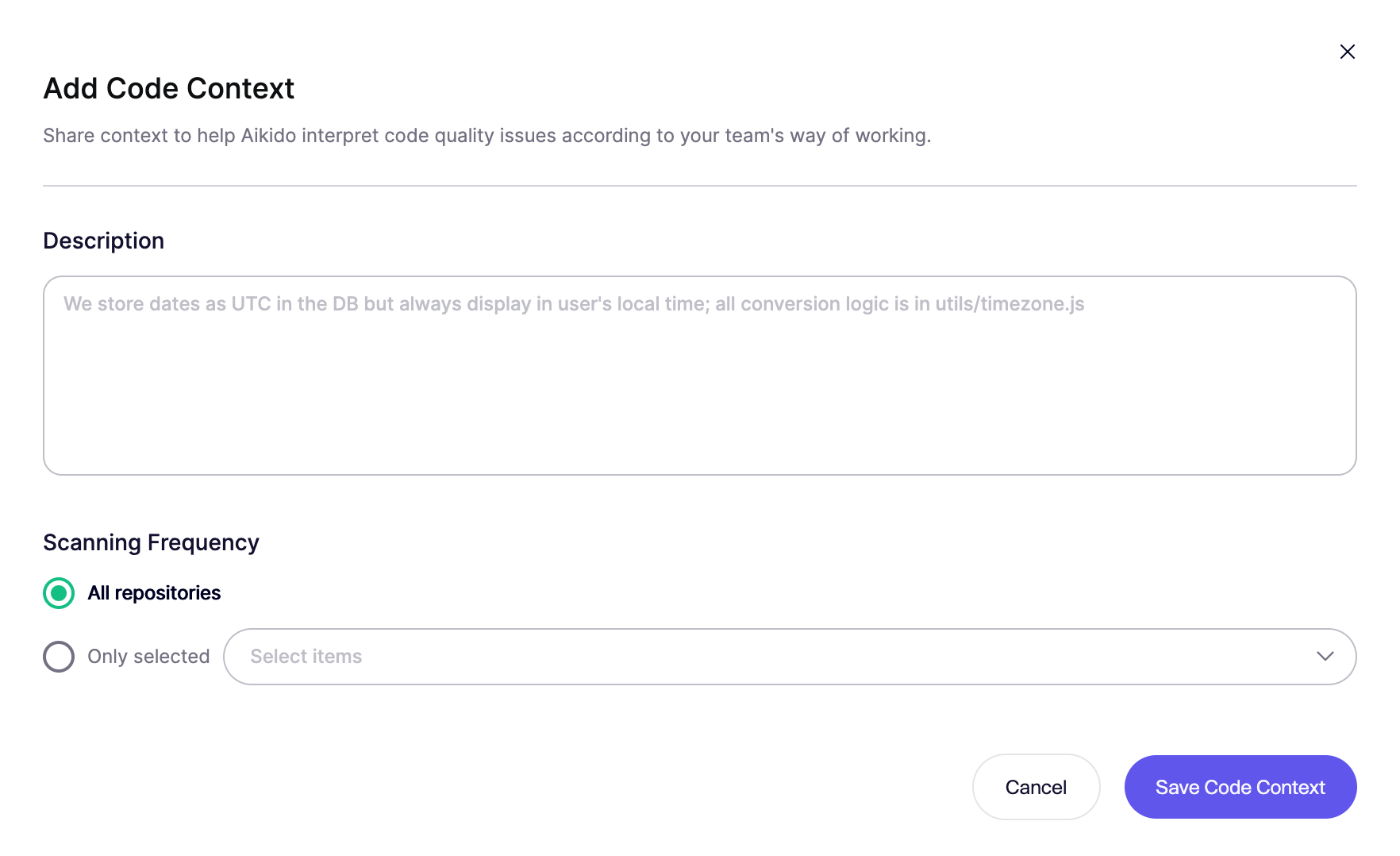
手順2. Add Code Contextをクリックして新しいコードコンテキストを追加します。
手順3. Code Contextを定義します
- チームの慣行や例外を説明する明確な説明を記載する
- 適用範囲を選択する:
- All repositories - 組織全体に適用されます
- Selected repositories - 特定のリポジトリのみに適用されます
Code ContextとCustom Code Rulesの違い
Section titled “Code ContextとCustom Code Rulesの違い”どちらの機能をいつ使うべきかを理解するための簡単なガイドラインを紹介します。
Code Contextを使うべき場合:
Section titled “Code Contextを使うべき場合:”- 特定の領域でベストプラクティスに対する許容できる例外がある場合
- 特定の状況に応じて既存のルールを調整する必要がある場合
- アーキテクチャ上の決定について説明を提供したい場合
Custom Code Rulesを使うべき場合:
Section titled “Custom Code Rulesを使うべき場合:”- デフォルトのチェックでカバーされていない新しい基準を強制する必要がある場合
- コードベース固有の特定のパターンを検出したい場合
- 一貫した検出による厳格な強制が必要な場合
- 特定の違反についてPRをブロックしたい場合
フィードバックからCode Contextを生成する
Section titled “フィードバックからCode Contextを生成する”プルリクエストから直接、追加のコードコンテキストを加えることができます。@AikidoSecへコメントでフィードバックや説明を投稿するだけで、Aikidoが自動的に処理し、今後のレビューの精度向上に役立てます。